

Choosing a TV size is not just about buying the biggest screen that fits your budget. The right size depends on the room, the seating distance, the wall space, the viewing height, the mount type, and how the TV will connect to power, devices, and sound.
A TV that looks perfect in a store can feel too large in a small bedroom or too small across a long living room. Before you buy, measure the space, think through the viewing position, and decide whether the screen will sit on furniture or mount on the wall. If you want help planning the placement and installation, Artesoft provides a professional TV mounting service across the DMV area.
Need help choosing the right TV size and placement?
Artesoft can help with TV placement, viewing height, wall-mount planning, wire concealment, and secure installation after you choose the screen.
Quick answer
- Small bedrooms, offices, and apartments often work well with a 43-inch to 50-inch TV.
- Medium living rooms often work well with a 55-inch to 65-inch TV.
- Larger living rooms, basements, and media rooms often work well with a 75-inch to 85-inch TV.
- The final choice should depend on seating distance, actual TV width, wall space, mounting height, and cable access.
Why TV Size Matters Before Mounting
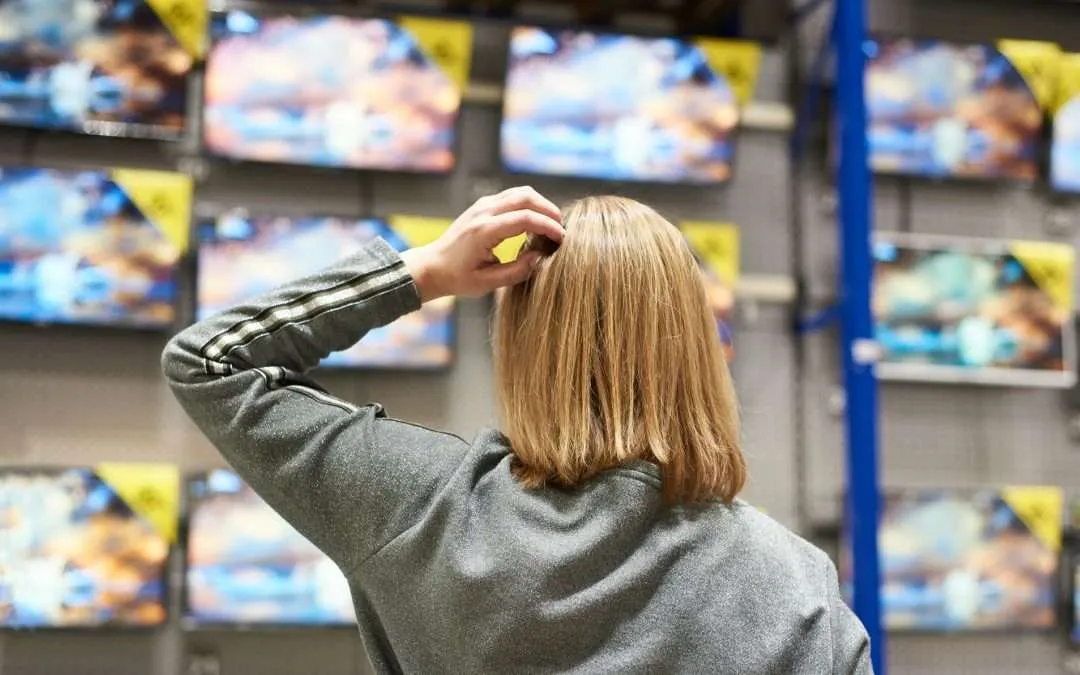
TV size affects the entire installation. A larger screen may need a different mount, a wider wall area, more careful lifting, a different viewing height, and a better plan for cable access.
The wrong size can create problems such as:
- The screen overwhelms a small room
- The TV looks too small from the main seating area
- The TV does not fit above furniture or between windows
- The screen sits too high after mounting
- The mount blocks outlets, cables, or ports
- The TV cannot center properly on the wall
- The old mount does not fit the new TV
- The soundbar or console no longer lines up visually
The goal is to choose a TV that feels comfortable to watch and works with the wall, furniture, mount, and cable path.
How TV Sizes Are Measured
TV size is measured diagonally across the screen. A 65-inch TV means the screen measures about 65 inches from one corner to the opposite corner.
When measuring, only measure the screen area. Do not include the bezel, frame, legs, or stand. Modern TVs often have thin frames, but the total outside dimensions can still matter when the TV needs to fit inside a cabinet, between shelves, or above furniture.
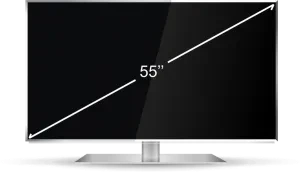
To measure a TV:
- Measure diagonally from the top-left corner of the screen to the bottom-right corner.
- Measure the full width from the left edge to the right edge.
- Measure the full height from the top edge to the bottom edge.
- Check the TV depth if the screen needs to sit in a cabinet or very close to the wall.
- Check where the power, HDMI, coax, Ethernet, and audio ports are located.
The diagonal size tells you the advertised TV size. The width and height tell you whether it will actually fit your room.
TV Screen Size Vs Actual Width And Height
The advertised TV size does not equal the width of the TV. Most modern TVs use a 16:9 screen shape, so the width is usually smaller than the diagonal size.
Measure Before Buying Checklist
- Measure the viewing distance from the main seat to the wall.
- Measure the open wall width where the TV should go.
- Measure the furniture, console, mantel, or cabinet below the screen.
- Check the TV’s actual width and height, not only the diagonal size.
- Check the outlet, cable, and device locations.
- Confirm soundbar space if you plan to use one.
- Decide whether the TV will use a fixed, tilting, full-motion, or fireplace mount.
- Confirm the TV weight and VESA pattern before choosing or reusing a mount.
Common TV Sizes And Approximate Dimensions
| TV size | Approximate width | Approximate height | Common room fit |
|---|---|---|---|
| 43 inch | 38 inches | 22 inches | Bedroom, office, small apartment |
| 50 inch | 44 inches | 25 inches | Bedroom, small living room |
| 55 inch | 48 inches | 27 inches | Bedroom, apartment, medium living room |
| 65 inch | 57 inches | 32 inches | Living room, basement, media room |
| 75 inch | 65 inches | 37 inches | Larger living room or media room |
| 85 inch | 74 inches | 42 inches | Large room, home theater, long seating distance |
These are approximate dimensions. Always check the manufacturer’s exact width and height for the model you plan to buy.
Before buying, measure the wall area and leave room for furniture, speakers, a soundbar, windows, trim, mantel clearance, and any nearby shelves.
Viewing Distance Guidelines
Viewing distance is one of the biggest factors in choosing TV size. A larger TV can feel immersive from the right distance, but it can feel uncomfortable if the seating is too close.
There is no single perfect size for every room, but these ranges are a practical starting point:
TV Size And Viewing Distance Guide
| TV size | Comfortable viewing distance range |
|---|---|
| 43 inch | About 5 to 7 feet |
| 50 inch | About 6 to 8 feet |
| 55 inch | About 7 to 9 feet |
| 65 inch | About 8 to 10 feet |
| 75 inch | About 9 to 12 feet |
| 85 inch | About 10 to 14 feet |
Measure from the main seating position to the wall where the TV will go. If your room has several seating positions, choose a size that works for the primary seats first.
A larger screen may work well for movies, sports, and gaming, but daily viewing comfort still matters. If people will watch for long periods, avoid choosing a size that forces constant head movement from normal seating.
Room Layout And Wall Space
After you estimate the TV size from viewing distance, check the physical space. A TV needs to fit the wall and the room visually.
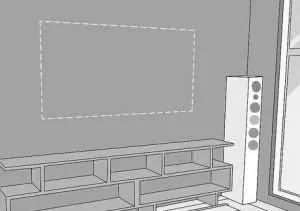
Measure:
- Wall width where the TV will mount
- Distance between windows, shelves, doors, or trim
- Furniture width below the TV
- Console, dresser, or cabinet depth
- Mantel height if the TV will go above a fireplace
- Soundbar width and placement
- Outlet and cable locations
- Clearance for a full-motion mount if the TV needs to swivel
For a balanced look, the TV should usually relate to the furniture below it. A very wide TV above a small console can look awkward, while a small TV above a wide console can feel undersized.
If the TV will sit inside a cabinet or built-in, measure the opening carefully. Leave space for ventilation, cables, and access to ports.
TV Height And Eye-Level Planning
TV size affects mounting height because larger screens have taller panels. If you center a larger TV at eye level, the bottom edge may sit lower than expected. If you mount it too high, the center of the screen can move above a comfortable viewing angle.
For most rooms, the center of the TV should sit near seated eye level. This is not a fixed number because seating height, room layout, TV size, and furniture all change the result.
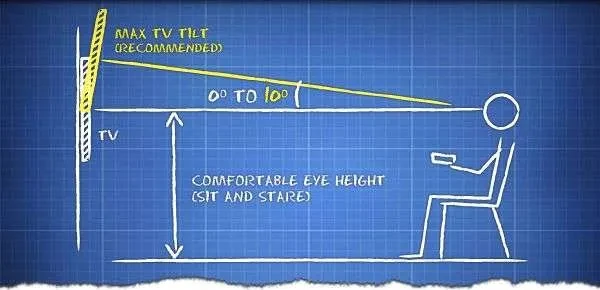
Use this basic process:
- Sit in the main viewing seat.
- Measure your eye height from the floor.
- Mark the approximate center of the TV on the wall.
- Compare that mark to the TV’s actual height.
- Check furniture, console, soundbar, and outlet clearance.
If the TV is going above a fireplace, the screen usually sits higher than ideal. In that case, a tilting mount or pull-down fireplace mount may improve the viewing angle. For fireplace-specific planning, see Artesoft’s TV over fireplace installation service.
Not sure what TV size or height will look right on your wall?
Artesoft can help compare the screen size, furniture width, viewing height, wall structure, and mount type before installation.
How TV Size Affects Mount Choice
The TV size affects the bracket you need. The mount must support the screen size, TV weight, and VESA pattern on the back of the TV.
Larger TVs may require:
- A stronger wall mount
- A wider wall plate
- More careful stud alignment
- A second person or professional crew for lifting
- Better cable access behind the screen
- More planning if using a full-motion mount
A fixed mount can work well when the TV is at a comfortable height and the seating position is directly in front of it. A tilting mount helps when the TV sits higher than normal. A full-motion mount can help when the room has multiple viewing positions, but it requires stronger wall planning because the arm creates leverage.
For a deeper mount comparison, see our guide on how to choose the right TV wall mount.
Cable And Device Planning
TV size and placement affect where the cables need to go. Before buying or mounting the TV, check whether the outlet, HDMI cables, soundbar, streaming devices, game consoles, and cable box will work with the planned screen location.
Plan for:
- Power location behind or near the TV
- HDMI cable length
- Soundbar connection type
- Coax, Ethernet, or antenna connections
- Streaming devices behind the screen
- Cable box or game console location
- Recessed outlet or media box placement
- Whether wires should be hidden
If you want a clean finished setup, plan wire concealment before the TV goes on the wall. It is easier to route cables before the screen and mount block access.
Common TV Size Mistakes
Avoid these issues when choosing a TV size:
TV Size Planning Checklist
- Choosing the biggest TV without measuring the wall
- Measuring only the diagonal size
- Forgetting that actual width is different from advertised size
- Ignoring seating distance
- Mounting a large TV too high
- Buying a TV that does not fit the existing mount
- Forgetting the VESA pattern and TV weight
- Not checking HDMI and power port locations
- Leaving no room for a soundbar
- Choosing a TV that overwhelms the furniture below it
- Forgetting cable routing before installation
- Assuming an above-fireplace TV will feel comfortable without tilt
If you already bought the TV, measure the actual screen and wall area before drilling. A few minutes of planning can prevent a poor viewing height, blocked cables, or an off-center installation.
When To Hire A Professional
Some TV size decisions are simple. If the TV sits on a stand in a small room, you may only need to measure the furniture and viewing distance.
You should consider professional TV mounting help when:
- The TV is large or heavy
- You are unsure where the TV should sit on the wall
- The TV is going above a fireplace
- You want the screen centered over furniture
- You need hidden wires
- The wall is brick, concrete, tile, stone, plaster, or metal stud
- The old mount may not fit the new TV
- You are using a full-motion mount
- You want help choosing the right height before drilling
Professional installation helps connect the TV size decision to the wall structure, mount type, viewing height, and final cable path. For a full overview of installation planning, see our guide on how to mount a TV on the wall.
TV Size FAQ
How is TV size measured?
TV size is measured diagonally across the screen, from one corner to the opposite corner. Do not include the frame, bezel, legs, or stand when measuring the screen size.
What size TV should I buy for a living room?
Many living rooms work well with a 55-inch to 75-inch TV, depending on seating distance and wall space. Larger rooms or media rooms may support an 85-inch TV if the seating distance and wall layout fit.
How far should I sit from a 65-inch TV?
A 65-inch TV often feels comfortable from about 8 to 10 feet away. The ideal distance depends on picture quality, personal preference, room layout, and whether you want a more immersive viewing experience.
Is a bigger TV always better?
No. A bigger TV can feel more immersive, but it can also overwhelm a small room, sit too high on the wall, or force uncomfortable head movement if the seating is too close.
How high should I mount my TV?
For most standard rooms, the center of the screen should sit close to seated eye level. The right height depends on the TV size, seating height, furniture, and whether the TV needs to go above a fireplace.
Does TV size affect the mount I need?
Yes. The mount must support the TV’s size, weight, and VESA pattern. Larger TVs may also need a wider wall plate, stronger wall support, and more careful lifting.
Can I use my old TV mount with a new TV?
Sometimes. Check the old mount’s weight rating, screen-size range, and VESA compatibility. You should also confirm that the old wall plate location works for the new TV’s height and width.
Should I plan wire concealment before buying the TV?
Yes. TV size, port location, mount type, and final placement all affect cable routing. Planning wire concealment early can make the finished installation cleaner.
Final Thoughts
The best TV size depends on the room, not just the sale price or screen diagonal. Measure the wall, check the actual TV width and height, confirm the viewing distance, and think through mounting height before buying.
If you plan to mount the TV, also check the mount type, TV weight, VESA pattern, cable path, and wall structure. These decisions work together, and they affect how comfortable and clean the finished setup will be.
Need help choosing the right TV size and wall placement?
Artesoft can help with TV placement, mount selection, viewing height, wire concealment, and secure installation.