

Mounting a TV on the wall can make a room look cleaner, open up floor space, and create a better viewing setup. The challenge is that a good result depends on more than attaching a bracket to drywall. You need the right mount, the right wall location, accurate measurements, secure fasteners, and a plan for power and cables.
This guide explains the main steps so you can understand what a clean TV wall mounting project requires before you start. If you want the TV mounted securely with a cleaner finished look, Artesoft provides a professional TV mounting service for homes and businesses across the DMV area.
Want a clean TV wall mount installation?
Artesoft can help with TV placement, mount selection, wall-surface planning, wire concealment, and secure installation.

Why TV Wall Mounting Takes Planning
TV wall mounting looks simple from the outside, but the quality of the finished result depends on several decisions made before drilling begins. The wall type, stud layout, TV size, bracket style, outlet location, and viewing height all affect the installation.
A rushed installation can lead to common problems:
- The TV sits too high or too low
- The screen is not level
- The bracket is not fastened into the right structure
- Cables are visible or pinched
- Inputs are blocked by the wall or mount
- The mount type does not fit the way the room is used
The goal is not just to get the TV on the wall. The goal is to mount it securely and make the finished setup look clean.
Watch A Real TV Mounting Walkthrough
In this video, Artesoft technician Willy walks through key parts of a TV mounting setup, including planning, wall layout, and installation details that are easy to miss in a DIY project.
Before You Start
Before you open the mount box or mark the wall, confirm the basics. This is where many installation problems can be avoided.
Before You Start Checklist
- Confirm the TV size and weight
- Check the VESA pattern on the back of the TV
- Confirm the mount supports the TV size and weight
- Decide whether you need a fixed, tilting, or full-motion mount
- Identify the wall type
- Locate and verify the studs or structural support
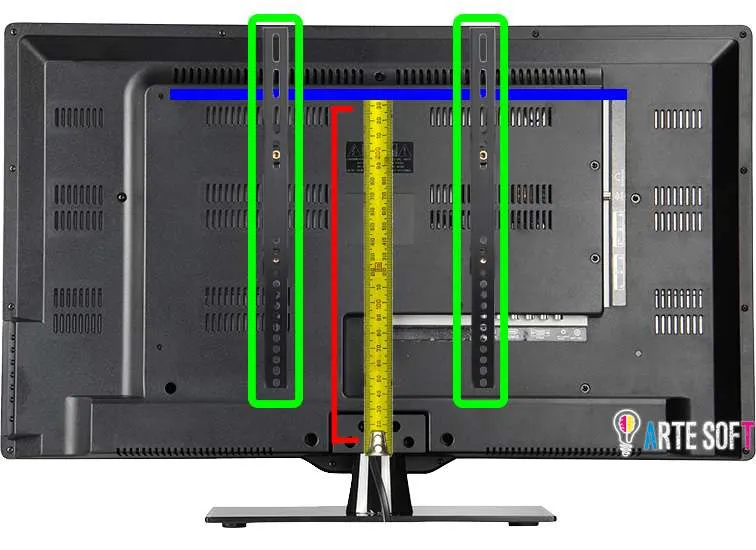
- Measure the TV width and height before marking the wall
- Decide the ideal TV height and viewing position
- Confirm the bracket hook-to-bottom-of-TV measurement
- Check where power and device cables will go
- Plan whether wires should be concealed
- Make sure you have the right drill bits and fasteners for the wall material
- Keep the TV manual and mount manual nearby
If the wall is brick, concrete, tile, marble, metal stud, or another difficult surface, the fastener plan matters even more.
Tools And Materials To Have Ready
The old drywall mounting checklist is useful because it separates the project into preparation, measuring, drilling, and final testing. Before starting, gather the tools and parts so you are not improvising while the mount is halfway installed.
TV Mounting Tool Checklist
- Stud finder
- Tape measure
- Pencil or painter’s tape for wall marks
- Level, preferably magnetic or digital
- Drill or impact driver
- Drill bits matched to the wall material
- Socket or driver bit for lag screws
- Screwdriver set
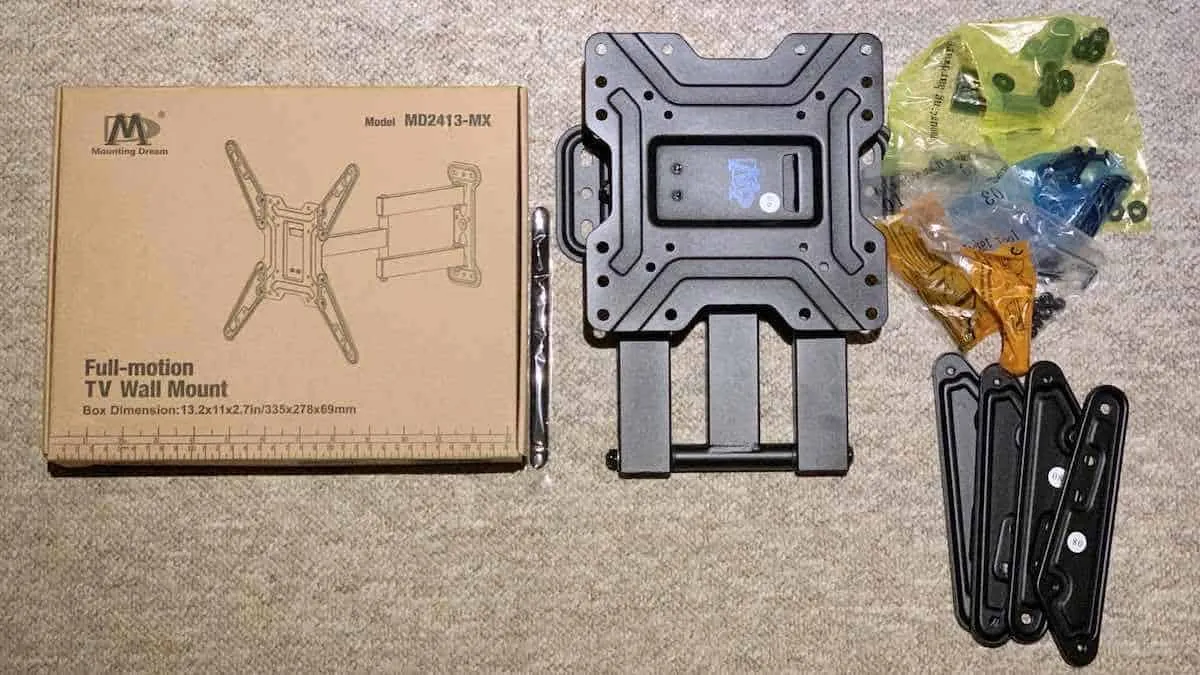
- TV mount hardware
- TV bracket screws, washers, and spacers
- HDMI and device cables
- Cable management or wire concealment supplies
- A second person for lifting larger TVs
For drywall installations, the most important checklist items are stud verification, level marks, correct bracket screws, and a careful final stability check before the TV is released onto the mount.
Choosing The Right TV Mount
The best TV mount depends on the room, the viewing angle, and how close you want the TV to sit to the wall.
Fixed Mount
A fixed mount keeps the TV close to the wall and creates the cleanest low-profile look. It works well when the seating position is directly in front of the TV and the screen is mounted at a comfortable height.
Fixed mounts are not ideal when the TV needs to angle toward different seats or when the screen is mounted high above eye level.
Tilting Mount
A tilting mount lets the screen angle slightly up or down. This is helpful when the TV is mounted higher than normal, such as above furniture or a fireplace.
Tilting mounts still keep the TV relatively close to the wall, but they give more viewing flexibility than a fixed mount.
Full-Motion Mount
A full-motion mount lets the TV extend, swivel, and angle for different seating positions. This can be useful in open rooms, kitchens, offices, corners, and rooms where the viewing position changes.
Full-motion mounts require stronger planning because the bracket carries more leverage when extended away from the wall. The wall structure and fasteners need to match the load.
Specialty Mounts
Some rooms need specialty mounting solutions, such as a pull-down fireplace mount or a ceiling mount. If wall space is limited, Artesoft’s ceiling TV mounting page covers that specific setup, but most standard wall-mounted TV projects should start with the main TV mounting service.
TV Wall Mounting Steps
Step 1: Choose The TV Location And Height
Start by deciding where the TV should go, not where the studs happen to be easiest to reach. The TV should work with the room layout, seating position, furniture height, and viewing angle.
For most living rooms, the center of the screen should be near seated eye level. Higher placements can work, but they need more planning because they can create neck strain or glare.
If the TV is going above a fireplace, review the fireplace height, heat exposure, wall material, cable route, and viewing angle before committing to the location. For that specific situation, see Artesoft’s TV over fireplace installation service.
Step 2: Identify The Wall Type And Stud Layout
The wall type determines the fasteners and drilling method. Drywall over wood studs is different from brick, concrete, tile, stone, plaster, or metal studs.
For standard drywall, the mount should usually be secured into studs when possible. Drywall alone is not enough for most TV mounting projects. Use a stud finder, verify the stud edges, and confirm the mount holes align with the structure.
Step 3: Confirm The Mount And TV Bracket Setup
Attach the TV-side brackets according to the mount instructions. Check that the screws fit the TV properly and that any required spacers or washers are installed correctly.
Do not force screws that are too long or too short. The wrong screw length can damage the TV or leave the brackets insecure.
Step 4: Mark, Level, And Drill Carefully
Drilling note: Before drilling, confirm the wall type, stud location, and whether any electrical, plumbing, or low-voltage lines may be behind the wall.
Use the mount template or hold the wall plate in place while marking holes. Check level before drilling. Small measuring errors can become very noticeable once a large screen is hanging on the wall.
For a cleaner marking process, outline the TV position first, mark the bottom of the TV, then transfer the bracket hook measurement to the wall. This helps place the wall plate where the TV actually needs to hang instead of guessing from the mount position alone.
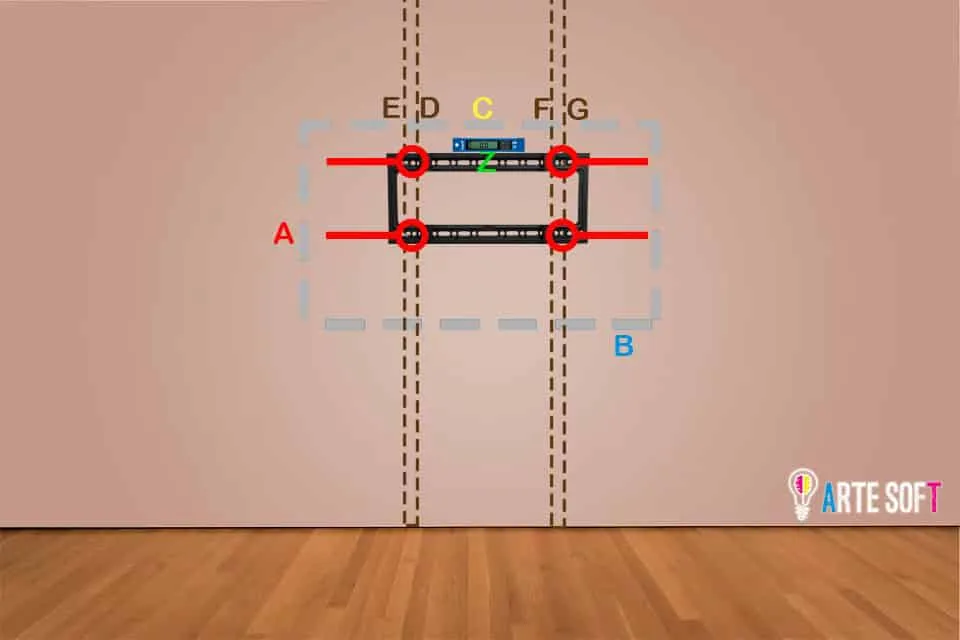
Drill according to the wall material and the mount manufacturer’s instructions. For masonry, tile, concrete, or stone, the bit type and anchor choice are especially important.
Step 5: Secure The Wall Plate
Fasten the wall plate securely, but do not overtighten hardware to the point that it damages the wall, fastener, or mount. Recheck level before fully tightening everything.
Once the wall plate is installed, apply a careful stability check before lifting the TV. The bracket should not shift, loosen, or flex in a way that suggests the fasteners missed the structure. If anything feels uncertain, stop and reassess before continuing.
Step 6: Plan Cables Before Hanging The TV
Connect any cables that will be hard to reach after the TV is mounted. This may include HDMI cables, optical audio, power-related setup, streaming devices, game consoles, or soundbar wiring.
If you want a cleaner finish, plan wire concealment before the TV goes on the wall. Cable routing is much easier before the screen blocks access, and this should be treated as part of the main mounting plan instead of a separate afterthought.
Step 7: Hang, Level, And Test The TV
Large TVs should be lifted by two people. Once the TV is seated on the mount, confirm that the locking mechanism is engaged and the screen is level.
Test the TV, apps, HDMI devices, soundbar, and cable path before cleaning up the area.
After Mounting Checklist
- Confirm the TV is fully seated on the mount
- Confirm the safety locks are engaged
- Check that the screen is level
- Make sure cables are not pinched
- Test HDMI devices and streaming apps
- Check the viewing angle from normal seating positions
- Confirm the finished wall view looks clean
Common TV Mounting Mistakes To Avoid
The most common TV mounting mistakes usually happen before the TV is lifted.
Avoid these issues
- Choosing a mount that does not support the TV size or weight
- Skipping the VESA pattern check before buying a mount
- Mounting the TV too high for normal viewing
- Marking the wall before measuring the bracket hook position
- Assuming drywall alone can support the installation
- Using the wrong anchors for the wall type
- Forgetting to plan power and HDMI access
- Pinching cables behind a low-profile mount
- Installing a full-motion mount without enough structural support
- Mounting above a fireplace without checking height, heat, and viewing angle
- Hiding power cables in a way that does not meet local requirements
If the installation involves a difficult wall, a large screen, a fireplace, or concealed wiring, the margin for error is smaller.
When To Hire A Professional
Some TV mounting projects are manageable as DIY work, especially when the wall is simple drywall, the TV is moderate in size, the outlet is already nearby, and the mount is straightforward.
You should consider a professional TV mounting service if:
- The TV is large or heavy
- The wall is brick, concrete, tile, marble, stone, or metal stud
- The TV is going above a fireplace
- You want the wires hidden
- You need help choosing the right mount
- The stud layout is not ideal
- The TV needs to be mounted very close to the wall
- You are unsure about the wall structure or fasteners
- You want a cleaner finished setup with fewer visible cables
Professional installation is not just about speed. It helps reduce the chance of wall damage, poor placement, unsafe fastening, and a messy finished result.
TV Wall Mounting FAQ
How high should I mount my TV?
For most rooms, the center of the screen should be close to seated eye level. The right height depends on the TV size, seating distance, furniture, and whether the screen needs to sit above another feature like a fireplace.
Can I mount a TV on drywall?
Yes, but the mount should usually be fastened into studs or another approved support method. Drywall alone is not enough for most TV wall mounting projects.
What type of TV mount should I use?
Use a fixed mount for a close-to-wall look, a tilting mount for higher placements, and a full-motion mount when you need flexible viewing angles. The mount must support the TV size, weight, and VESA pattern.
Can TV wires be hidden inside the wall?
Low-voltage cables can often be concealed when the wall path is appropriate. Power cables should not simply be run through the wall unless the setup is designed for that use and follows local requirements.
Can a TV be mounted above a fireplace?
Yes, but fireplace installations need extra planning. Height, heat, wall material, cable routing, and viewing angle all matter.
Do I need a professional to mount my TV?
Not always. Simple drywall installations may be manageable for some homeowners. Professional help is usually worth considering for large TVs, difficult walls, fireplace installs, concealed wiring, or full-motion mounts.
Final Thoughts
A clean TV wall mount installation starts with planning. Choose the right mount, confirm the wall structure, set a comfortable viewing height, and decide how cables will be handled before drilling begins.
Need help mounting a TV cleanly and securely?
Artesoft can help with placement, mount selection, difficult wall surfaces, wire concealment, fireplace setups, and finished installation details.