

Choosing the right TV wall mount affects more than how the screen looks on the wall. The mount controls the viewing angle, wall clearance, cable access, bracket strength, and how clean the finished setup feels.
The best mount depends on the TV size and weight, the VESA pattern, the wall material, the stud layout, the room layout, and whether you need the screen to sit flat, tilt, swivel, pull down, or move from side to side. If you want help choosing and installing the right bracket, Artesoft provides a professional TV mounting service for homes and businesses across the DMV area.
Need help choosing the right TV mount?
Artesoft can help with mount selection, wall-surface planning, TV placement, wire concealment, and secure installation.

Why The Right TV Wall Mount Matters
A TV mount is not just a piece of metal that holds the screen. It determines how the TV sits on the wall, how much room you have for cables, how easy it is to reach ports, and how much force the wall fasteners need to carry.
Choosing the wrong mount can create problems such as:
- The TV sits too high, too low, or off-center
- The screen cannot tilt enough to reduce glare
- The mount blocks HDMI, power, or audio ports
- The TV sits farther from the wall than expected
- A low-profile mount leaves no room for cables
- A full-motion mount puts too much leverage on a weak wall
- The wall plate does not line up well with the studs
- The mount does not support the TV weight or VESA pattern
The right mount makes the installation safer and makes the finished wall look intentional.
Before You Buy A TV Wall Mount
Before choosing a bracket, gather the basic details about the TV, wall, and room. This prevents the most common mount-selection mistakes.
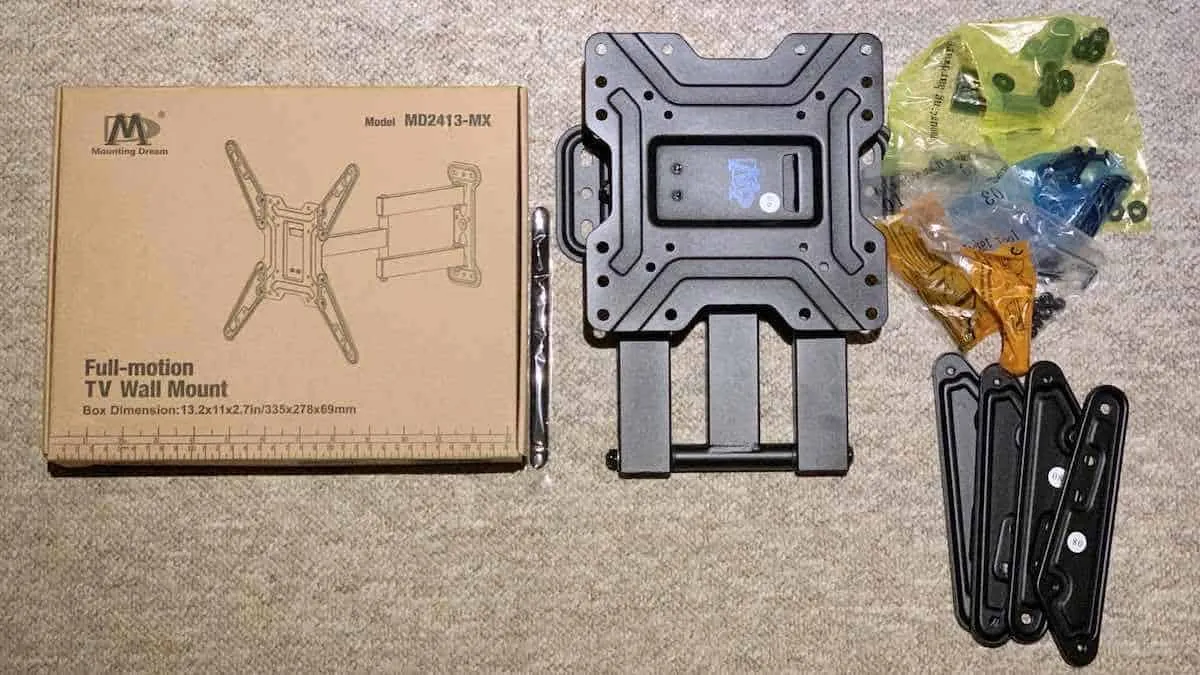
TV Wall Mount Buying Checklist
- Confirm the TV screen size
- Check the TV weight without the stand
- Find the VESA pattern on the back of the TV
- Confirm where the HDMI, power, and audio ports are located
- Decide whether the TV needs to sit flat, tilt, swivel, or extend
- Measure the wall area where the TV should go
- Check whether the TV needs to center over furniture, a console, or a fireplace
- Identify the wall type
- Locate the studs or structural support
- Check outlet and cable locations
- Decide whether wires should be hidden
- Confirm whether a soundbar, streaming device, or game console will connect to the TV
If you are not sure how the wall structure, mount type, and cable plan work together, professional help can make the bracket choice clearer before the installation starts.
Quick Mount Recommendations
If you want the short version, start here:
TV Mount Quick Chooser
| If your setup needs… | Start with this mount type | Why it helps |
|---|---|---|
| The cleanest close-to-wall look | Fixed mount | Keeps the TV low-profile when the seating position is straight ahead |
| A higher TV placement | Tilting mount | Lets the screen angle down toward the seating area |
| Multiple viewing positions | Full-motion mount | Lets the TV extend, swivel, and angle toward different parts of the room |
| A TV above a fireplace | Tilting or pull-down fireplace mount | Helps with viewing angle and high placement, but needs careful wall and heat planning |
| No usable wall space | Ceiling mount | Uses overhead structure when the wall is not the right option |
| A gallery-style installation | Slim or specialty mount | Keeps the TV close to the wall, but cable planning becomes more important |
Consider professional help when the TV is large, the wall is difficult, the mount is full-motion, the TV is going above a fireplace, or you want hidden wires. Those are the situations where mount choice, fasteners, and placement matter most.
Types Of TV Wall Mounts
Most TV wall mounts fall into a few main categories. Each one works best in a different room setup.
| Mount type | Best for | Main tradeoff |
|---|---|---|
| Fixed mount | Clean, low-profile installations with one main seating position | Less access behind the TV |
| Tilting mount | Higher placements and glare control | Limited side-to-side adjustment |
| Full-motion mount | Open rooms, corners, and multiple viewing positions | More wall leverage and more planning required |
| Pull-down fireplace mount | TVs mounted high above a fireplace | More complex installation and clearance planning |
| Ceiling mount | Rooms without usable wall space | Needs proper overhead structure and cable routing |
| Slim/gallery-style mount | Flush, design-focused installs | Very little room for cables and devices |
Fixed TV Mount
A fixed mount keeps the TV close to the wall. This creates a clean, low-profile look and works well when the seating position is directly in front of the TV.
Fixed mounts are best for:
- Living rooms with one main viewing position
- Bedrooms where the TV sits at a comfortable height
- Clean, simple installations
- Rooms where the TV does not need to move
The tradeoff is access. Fixed mounts often leave less room behind the TV, so HDMI cables, power connections, recessed outlets, and streaming devices need to be planned carefully.
Tilting TV Mount
A tilting mount lets the screen angle slightly up or down. This helps when the TV needs to sit higher than seated eye level, such as above a dresser, console, or fireplace.
Tilting mounts are best for:
- Higher TV placements
- Reducing glare from windows or lights
- Improving viewing angle from a seated position
- Keeping the TV fairly close to the wall while adding some adjustment
A tilting mount can also make it easier to reach cables compared with a fixed mount, depending on the bracket design.
Full-Motion TV Mount
A full-motion mount lets the TV extend, swivel, and angle from side to side. This type is useful when the viewing position changes or the TV needs to face more than one part of the room.
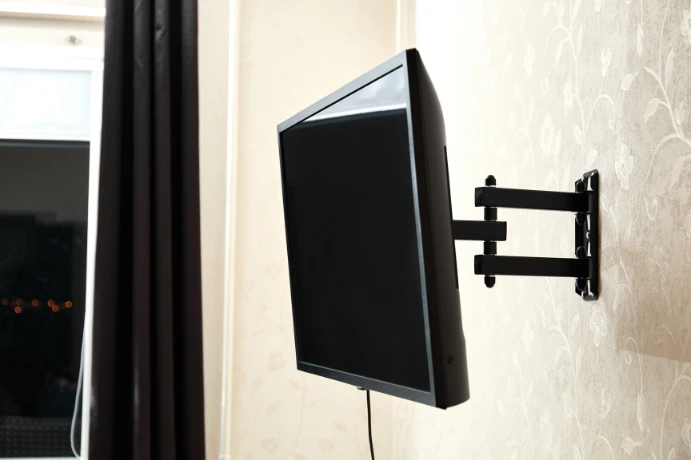
Full-motion mounts are best for:
- Open-concept rooms
- Kitchens and dining areas
- Corners
- Offices
- Rooms with multiple seating positions
- Situations where cable access behind the TV matters
Full-motion mounts need more structural planning because the arm creates leverage when the TV extends away from the wall. The larger the screen and the farther the arm extends, the more important the wall support becomes.
Pull-Down Fireplace Mount
A pull-down fireplace mount lets the TV move down from a high position above a fireplace. This can improve viewing comfort when the mantel sits higher than normal TV height.
This type of mount requires careful planning because fireplace installations can involve heat, masonry, mantel clearance, recessed boxes, and difficult cable paths. For this situation, see Artesoft’s TV over fireplace installation service.
Ceiling TV Mount
A ceiling mount can work when the wall is not usable or when the TV needs to hang in a commercial space, gym, office, basement, or room with limited wall area.
Ceiling mounts need proper overhead structure and a clear plan for power and cables. If wall space is limited, Artesoft’s ceiling TV mounting page covers that specific setup.
Slim Or Gallery-Style Mount
Some TVs use very slim mounts for a flush, gallery-style look. These installations need careful cable planning because there may be very little room between the TV and the wall.
Samsung Frame TVs are a common example. If you are planning a gallery-style setup, Artesoft’s Samsung Frame TV installation service covers the mount, One Connect cable, wall clearance, and finished look.
TV Size, Weight, And VESA Pattern
The mount must fit the TV physically and structurally. Do not choose a mount by screen size alone.
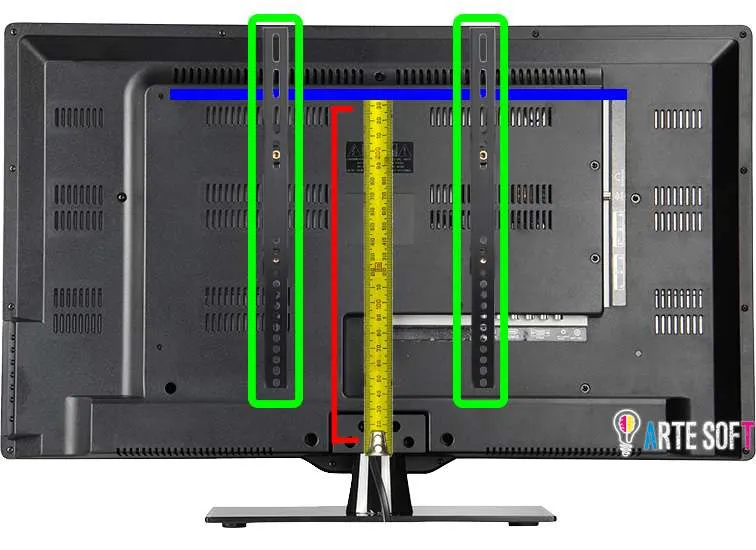
TV Size
Mount packaging often lists a screen-size range, such as 32 to 65 inches or 55 to 85 inches. Treat that as a starting point, not the only requirement.
Two TVs with the same screen size can have different weights, depths, port locations, and VESA patterns.
TV Weight
Every mount has a weight rating. The TV weight should stay within that rating, and you should check the TV weight without the stand attached.
Modern TVs are often lighter than older TVs of the same screen size, but that does not mean every old mount should be reused. Older brackets may have worn hardware, missing safety screws, limited VESA compatibility, or a wall plate that no longer works for the new screen position.
VESA Pattern
The VESA pattern is the spacing between the mounting holes on the back of the TV. Common examples include 200×200, 300×300, 400×400, and 600×400 millimeters.
The mount must support the TV’s VESA pattern. If it does not, the brackets may not attach correctly, even if the mount claims to support the TV’s screen size.
Wall Type And Stud Layout
The wall matters as much as the mount. Drywall over wood studs, metal studs, brick, concrete, plaster, tile, marble, and stone all require different planning.
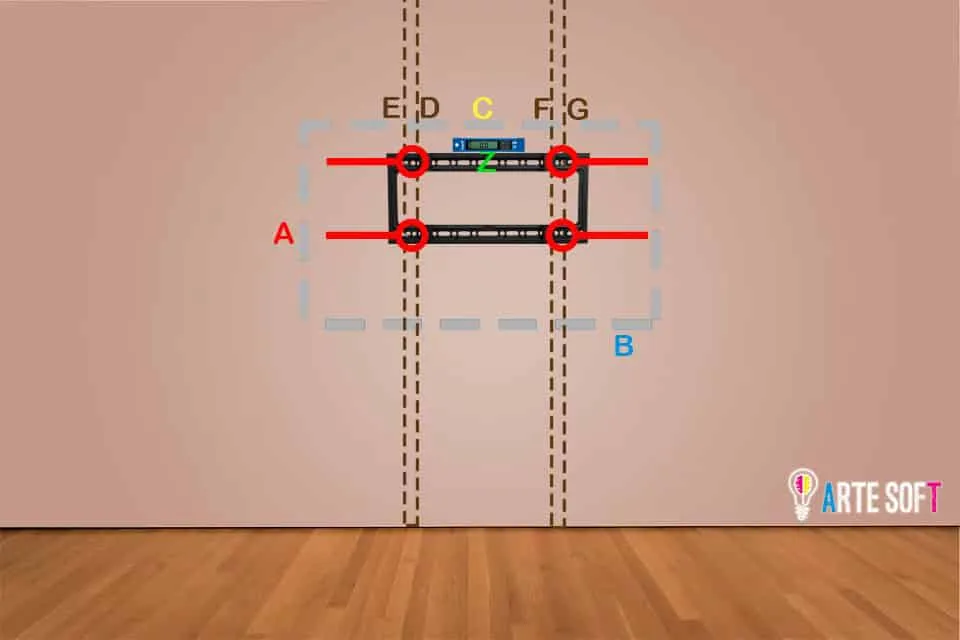
For standard drywall installations, the mount should usually fasten into studs or another approved support method. Drywall alone is not enough for most TV wall mounting projects.
Wall plate width also matters. A wider wall plate can make it easier to reach studs while keeping the TV centered. In many homes, studs are commonly spaced 16 inches apart, though some layouts may differ. A narrow wall plate can make centering harder if the studs do not land where the TV should sit.
For difficult walls, the installer needs the right fasteners, drill bits, and mounting method. Brick, concrete, tile, stone, and metal studs should not be treated like standard drywall.
Not sure whether your wall can support the mount?
If the wall surface or stud layout is not straightforward, this is a good point to bring in a professional. The right mount only works safely when the wall plate, fasteners, and structure match the TV and bracket.
For a full installation process, see our guide on how to mount a TV on the wall.
Viewing Angle, Glare, And Room Layout
Before choosing a mount, think about how the room is actually used. The right bracket depends on the seating position, furniture layout, window placement, lighting, and whether people watch the TV from more than one area.
Ask these questions:
- Will most people sit directly in front of the TV?
- Does the TV need to angle toward a kitchen, dining table, or side seating?
- Will windows or lights create glare?
- Is the TV going above normal eye level?
- Does the TV need to clear furniture, a mantel, or a console?
- Will a soundbar sit below the screen?
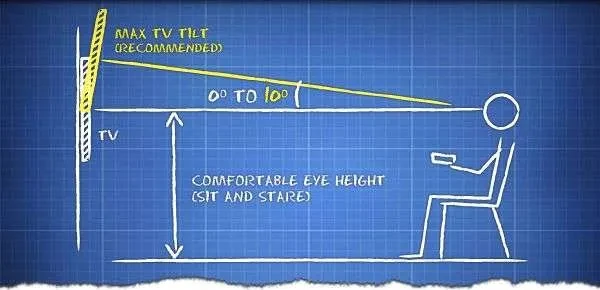
If the TV sits near seated eye level and faces one main seating area, a fixed mount may work well. If the TV sits higher, a tilting mount usually makes more sense. If the room has multiple viewing positions, a full-motion mount may be the better choice.
Cable Access And Wire Concealment
Cable planning should happen before the mount goes on the wall. The mount style affects how much room you have behind the TV and whether you can reach ports after installation.
A fixed low-profile mount can look clean, but it may leave very little space for HDMI cables, power adapters, streaming devices, or thick connectors. A tilting or full-motion mount can provide better access, but it may not sit as close to the wall.
Plan for:
- Power location
- HDMI and device cables
- Soundbar wiring
- Coax or Ethernet
- Streaming devices
- Recessed outlet or power kit placement
- Low-voltage wall plates
- Future access if a cable needs to be replaced
If you want a cleaner finished setup, plan wire concealment at the same time as the mount. Cable routing is much easier before the TV is hanging on the wall.
Common Mount Selection Mistakes
Most mount problems start before installation. Avoid these issues when choosing a TV wall mount:
Avoid These TV Mount Mistakes
- Buying a mount based only on screen size
- Forgetting to check the TV weight
- Skipping the VESA pattern
- Choosing a fixed mount when the TV needs to sit high
- Choosing a full-motion mount without checking wall support
- Ignoring where the TV ports are located
- Forgetting about soundbar or device cables
- Assuming every wall uses the same fasteners
- Using a narrow wall plate when the TV needs to stay centered between studs
- Reusing an old mount without checking the new TV’s size, weight, and VESA pattern
- Choosing an ultra-slim mount without planning cable clearance
- Mounting above a fireplace without checking height, heat, wall material, and cable routing
The mount should fit the TV and the room. It should also match the wall structure and the way the screen will be used every day.
When To Hire A Professional
Some TV mount choices are straightforward. A moderate-size TV on a simple drywall wall with a standard tilting mount may be manageable for some homeowners.
You should consider professional installation when:
- The TV is large or heavy
- The wall is brick, concrete, tile, marble, stone, plaster, or metal stud
- The TV is going above a fireplace
- You want hidden wires
- You need a full-motion mount
- The studs do not line up with the ideal TV location
- You are not sure which mount fits the TV
- The TV needs a very close-to-wall or gallery-style look
- You are replacing an old TV and want to reuse or evaluate the existing mount
- You want the finished installation to look cleaner
Professional mounting is not just about drilling faster. It helps with the mount selection, viewing height, wall support, fastener choice, cable access, and final alignment.
TV Wall Mount FAQ
What type of TV wall mount should I choose?
Choose a fixed mount for the cleanest close-to-wall look, a tilting mount for higher placements or glare control, and a full-motion mount when you need the TV to swivel or extend toward different viewing positions.
How do I know if a mount fits my TV?
Check the TV size, weight, and VESA pattern. The mount must support all three. Also confirm that the mount does not block ports or cable connections on the back of the TV.
Is a full-motion mount better than a fixed mount?
Not always. A full-motion mount gives more flexibility, but it usually sits farther from the wall and needs stronger structural planning. A fixed mount can look cleaner when the seating position is directly in front of the TV.
What is the best mount for a TV above a fireplace?
A tilting mount or pull-down fireplace mount is often better than a fixed mount because the TV usually sits higher than normal. Fireplace installations also need planning for heat, wall material, mantel clearance, and cable routing.
Can I reuse an old TV mount?
Sometimes. The old mount must support the new TV’s weight, size, and VESA pattern. You should also check that the wall plate is secure, level, and positioned at the right height for the new screen.
Does wall material affect the mount I should buy?
Yes. Drywall with wood studs, metal studs, brick, concrete, tile, stone, and plaster can require different fasteners and drilling methods. The wall material should be part of the mount-selection plan.
Should I choose a mount before deciding where the TV goes?
No. Decide the ideal TV location and viewing height first, then choose a mount that works with that placement, the wall structure, and the cable path.
Do I need a professional to choose and install a TV wall mount?
Not always. Simple installations may be manageable for some homeowners. Professional help is usually worth it for large TVs, full-motion mounts, difficult walls, fireplace installs, hidden wires, or any setup where the mount choice affects safety and the finished look.
Final Thoughts
The right TV wall mount depends on more than screen size. Check the TV weight, VESA pattern, wall type, stud layout, viewing angle, cable access, and how the room will be used.
A fixed mount can create a clean low-profile look. A tilting mount can improve higher placements. A full-motion mount can add flexibility, but it needs stronger wall planning. Specialty mounts can solve fireplace, ceiling, and gallery-style installations when the room requires something more specific.
Need help choosing and installing the right TV wall mount?
Artesoft can help with TV placement, mount selection, wall-surface planning, wire concealment, fireplace setups, and secure installation.